Higson is a business rules engine and a business logic management system focused on performance. It enables a modification of business logic without touching the application’s code. Despite such flexibility Higson searches huge decision tables (1M rows and larger) in microseconds. Higson also provides a domain-specific language that allows developers to create complex logic as well as modules like domain designer, simulation, regression tests, data persistence engine and much more.
Before we get into the details, let’s explore Higson most essential building blocks.
So, the most important concepts include:
- decision tables (also known as parameters)
- functions (custom algorithms)
- context (input data)
- domain (domain organizer)
Below is an introductory description of all these concepts.
Introduction to Decision Tables#
Higson is designed to let developers make any part of their application configurable on the fly. The easiest way to do that is make application’s code dependent on decisions or parameters. This is what we call parameterization.
Therefore, the decision table is a fundamental concept in Higson.
Each decision table is defined as a matrix or table in which we can configure how the outcome depends on the input data. The decision table is unlimited in size and performs fast whether it has 1000 rows or 1 million rows.
Below you can see decision table called tariff which returns tariff factor
depending on the some input data (coverage code and coverage limit).
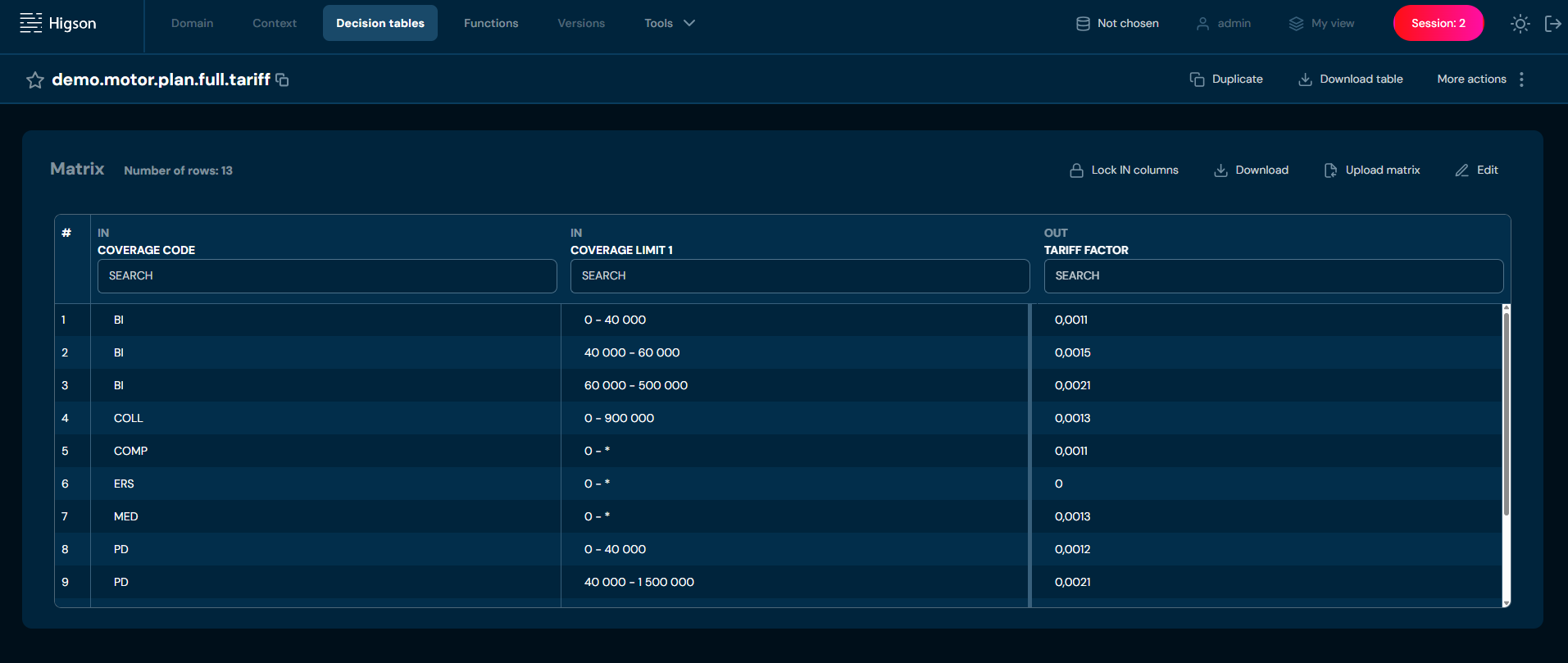
Now you can use this decision table in your application code.
For example, you can create insurance premium calculation formula that depends on tariff_factor - a value returned by the tariff
decision table:
premium_value := tariff_factor * insurance_sum + ...
Tariff decision table is defined in Higson, outside of the application’s code.
You can say that decision table is the basic concept that allows to separate business logic from application’s code.
Each decision table has its unique name, configured conditions (input columns) and output value. It can return single value, multiple values or even sub-matrix.
For detailed information on defining and working with decision tables, see Decision Tables.
Introduction to Functions#
Another key concept that helps move business logic outside of the application is function. Functions enable you to write code snippets in a regular programming language, which allows you to implement any logic you want. You can write functions where a decision table is not enough.
Functions can contain logic based on:
- any input data (any element from context),
- result of any decision table,
- result of another function.
Below you can see sample function that uses context (input) data and depends on two decision tables:
def age = ctx.getDecimal( 'customer.age' )        // reads customer's age from input

def factor = 1.5
if (age > 40) {
  factor = math.log(10, age)
}

def tariff  = higson.getNumber('tariff', ctx)     // get value from tariff decision table
def baseFee = higson.getNumber('base.fee', ctx)   // get value from base.fee decision table

def fee = baseFee * tariff * factor

return math.round(fee, 2)                         // return fee rounded to 2 digits
Higson functions provide a convenient API that allows you to:
- read input data (context),
- get result of a decision table,
- invoke other functions,
- operate on dates and texts,
- perform math operations,
- perform type conversions,
- log statements to the log file,
- read domain configuration objects.
The following image shows real function defined in Higson Studio (click to enlarge).
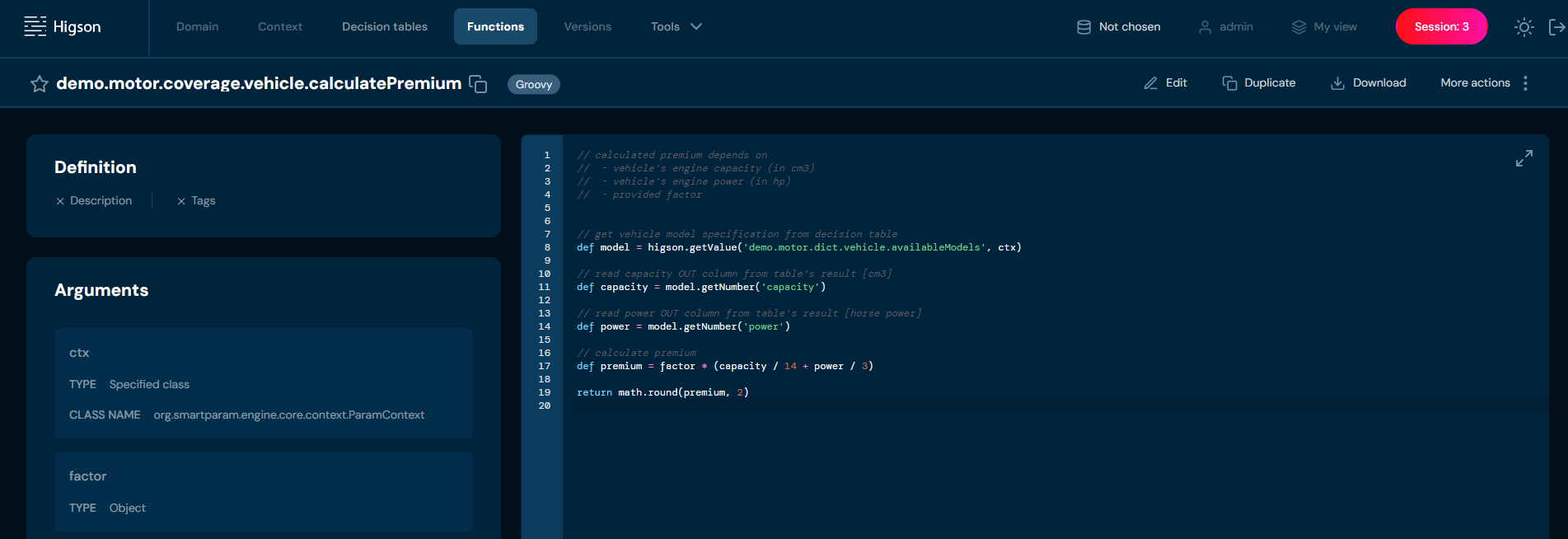
For detailed information on defining and working with functions, see Functions section.
Introduction to Context#
When application uses decision table or function, it’s result depends on the context. In other words - context is an object model containing all data that may affect evaluation of any decision table or function. Once we design a context model, we can make our parameterization dependent on any input value from the context.
Below is an example context definition:
[ROOT]                                  // root elements in context
 - policy          : Policy
 - cover           : Cover

[Policy]                                // Policy type definition
  - policyNo       : string
  - productCode    : string
  - insured        : Client
  - year           : integer
  - covers         : Cover[]

[Client]                                // definition of Client type
  - firstname      : string
  - lastname       : string
  - gender         : string
  - age            : integer
  - professionCode : integer
  - address        : Address
  ...

[Cover]                                 // definition of Cover type
  - code           : string
  - sumInsured     : number
  - basePremium    : number
  - startDate      : date
  - endDate        : date
  ...
The following list shows some valid paths for this example context:
policy.productCode
policy.insured.lastname
policy.insured.address.zipCode
policy.insured.age
cover.sumInsured
Each valid path represents some input value available to the logic of the decision table or function.
A context designed inside Higson Studio is a kind of interface or contract for the input data model. It should be abstracted from the application or database model. Context design should focus on business needs. Such context will be a conceptual bridge between the development team and the business analysts.
A context designed in abstraction from the application allows you to test business logic directly in Higson Studio, even if the application is not ready yet. Read Tester to learn how you can test the behavior of a decision table or function using the built-in simulator. On the other hand, the Batch Tester allows you to run multiple test cases at once.
For detailed information on defining and working with context, see Context.
Introduction to Domain#
Decision tables and functions answer the question of how you want to parameterize. Context answers the question of what the parameterization may depend on. And last but not least - domain answers the question of what you want to parameterize.
Indeed, domain model is what we want to be configurable.
- Using
Menu-Domain-Definitionwe can design domain types, their relationships and attributes. - Using
Menu-Domain-Configurationwe can create instances of domain types and configure their attributes with use of functions or decision tables.
To explain what domain definition and configuration is, it is best to use an example. Imagine we want to configure life insurance products:
- Each life insurance product consists of covers and funds,
- Each cover has different maximum insurance sum, availabilty logic, premium logic etc.,
- Each fund has different transfer fee etc.
We can use Domain definition to define types for our domain, for instance:
type:       Product
attributes: none
elements:
  - covers: Cover[]     // each Product has a collection of Cover elements
  - funds:  Fund[]      // each Product has a collection of Fund elements

type:       Cover
attributes:
  - max_insurance_sum   // value we want to configure
  - is_available        // boolean - we want to make cover unavailable for some contexts
  - base_premium        // decimal value that we want to calculate with our tariff algorithm

type:       Fund
attributes:
  - transfer_fee
  - ...
The above example domain definition says that:
- would be able to configure transfer_fee for each Fund
- would be able to configure max_insurance_sum for each Cover
- would be able to configure is_available for each Cover
- would be able to configure base_premium for each Cover.
Next, we can use Domain configuration to create configuration tree with domain elements and their attributes:
Product [code = PR1]
  covers
    * Cover[CA]
       - max_insurance_sum   =  10000
       - is_available        =  yes
       - base_premium        =  50.0
    * Cover[CB]
       - max_insurance_sum   =  from decision table : 'pr1.covers.maxInsuranceSum'
       - is_available        =  yes
       - base_premium        =  from function       : 'pr1.premium.calculate'
     ...

Product [PT3]
  covers
    * Cover[DB]
       - max_insurance_sum   =  from function       : 'default.maxInsuranceSum'
       - is_available        =  from decision table : 'pt3.cover.isAvailable'
       - base_premium        =  from decision table : 'pt3.tariff.basePremium'
     ...

and so on...
Now an application connected to Higson can use any defined logic solely through the domain layer. Here are some example scenarios:
- getting all products from domain tree,
- getting all covers for product
PR1, - getting all covers for product
PT3with attributeis_availableequal totrue, - calculate premium for given cover - just by getting value from
base_premiumattribute.
For larger projects, we do not recommend using decision tables and functions directly in your application code. Instead, we recommend using parameterization only through the domain layer.
This approach, which we call polymorphic configuration, makes the application even better decoupled from the business logic.
For detailed information on defining and working with domain, see Domain Definition and Domain Configuration.
Introduction to Testing Modules#
Higson Studio offers built-in testing modules: Tester and Batch Tester, which enable the verification of configurations before they are published in a session or deployed to the production environment. These modules allow testing of decision tables, functions, and domain elements.
- Tester allows for the validation of a single test case.
- Batch Tester enables the testing of multiple cases simultaneously, making it particularly useful for larger data sets.
The Higson Studio interface provides an intuitive way to select elements for testing and input relevant data. Users can also specify an expected value for each test case. This feature allows test results to be compared against expected business values, ensuring accurate configuration verification. Once a test or batch test is executed, a clear test report is generated, allowing users to quickly determine which test cases have passed and which have failed. Testing in Higson Studio helps users better understand the impact of changes on results and ensures the consistency of algorithm behavior across different scenarios. It is important to note that each batch test is based on singular tests, making it easier to design and scale tests. By using Tester and Batch tester, users gain full control over the quality and stability of business configurations.