Introduction
Higson as a Business Rules Management System is a system that helps organizations to manage, execute, and optimize their business rules from a centralized platform.
It is designed to easily handle large decision tables. Higson stands out for its extremely high performance and a designed matching algorithm to search large decision tables (1M rows and more) in a few microseconds.
What Higson offers?:
Higson offers a scripting language that allows users to write short functions that expand the capabilities of decision tables. Both software developers and operational staff can modify such functions or decision tables without touching the application’s code. The changes are immediately reflected in any application that uses the Higson engine.
Key features:
- Higson Studio - Web UI that lets users to manage easily their business rules
- Higson Runtime - engine embeddable as a lightweight jar to your business app
- High performance – all rules are stored in in-memory caches so higson provide immediately access and possibility to invoke them
- Time Versioning - create multiple versions of the business logic and schedule them in a timeline
- Domain Designer - design any domain you want to configure with business logic
- Decision tables - tabular representations for specifying which decisions are made using pre-defined conditions
- Functions – help define more complex logic in Groovy language
- Flows – visual role modeling help manage logic through intuitive flow diagrams.
Additional features:
- Context - rules use the context to reference actual business data needed to evaluate a rule
- Private session - there is no limit to the number of users working simultaneously; changes are not visible to other users before publishing
- Dev Mode - special mode to speed up the initial phase of the development; each change is immediately visible to the outside world.
- Built-in Profiles - monitor the usage of decision tables and DSL scripts or functions
- Import and Export from/to Excel - import and export configuration and tets cases from/to Excel.
- Multiple Databases support - Higson uses databases for storing rule configurations; supported databases: Oracle, MS SQL Server, PostgreSQL, MySQL
- Test features (tester, batch tester) - before publishing changes, user can tests whether the rules work as desired and check the impact on other rules by using a mass tester to perform regression tests
Who and how will use Higson?
There are 3 groups of users, that will use Higson:
- End User - application business end-user, which may modify values of previously configured domain.
- Developer - Developer codes your business application with higson support. Needs to prepare appropriate domain model at your app. Perform initial configuration which business user prepared firstly. Developer may mix higson features: domain, decision tables, functions to reflect business domain configuration.
- Business User – main designer of your domain. Initially Business User input final parameters values. Experienced Business User can perform highly sophisticated parameter redesigns without the necessity of application code change.
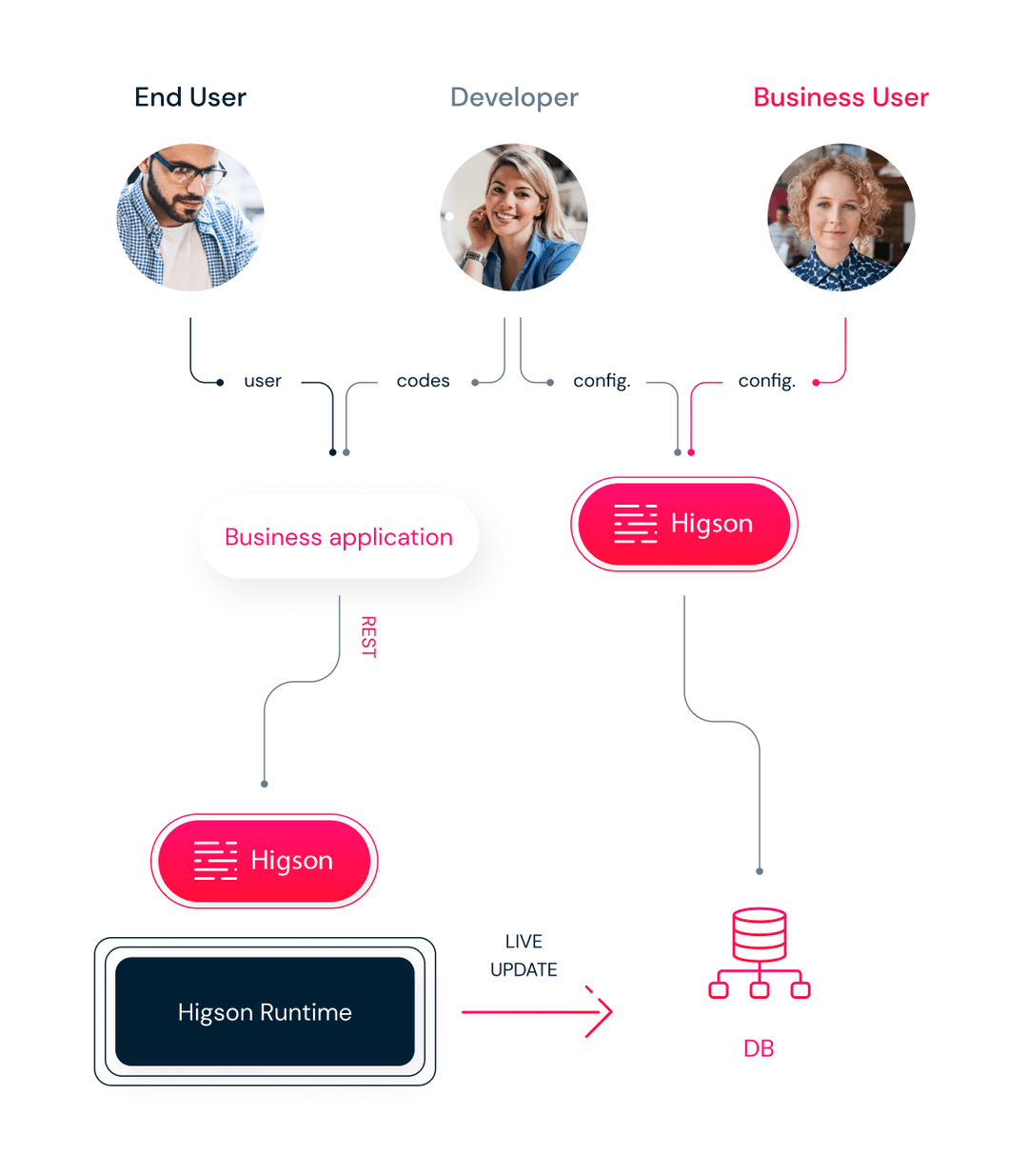
Here are short descriptions of components in the diagram:
- Higson Studio - the complex web-based user interface for setting up parametrization. The tool includes decision tables, functions and flows repository, domain definition and configuration, testing, and export-import capabilities.
- Business Application - Java application that has its business logic, parametrization externalized to Higson. The application is e.g. sales portal, product management system, policy life system. The parametrization is accessed via Higson Runtime.
- Higson Runtime – as an embedded jar library provides to your Business Application robust java API for decision tables/function/flows/domain access. The library is responsible for retrieving data from Database schema and caching it as an in-memory index within the Business Application. At fixed intervals the library checks for changes alterations and updates itself asynchronously. That approach significantly expedites parametrization calls.
- Database - storage for Higson externalized parametrization repository. Data is altered via Higson Studio. Higson Runtime Library accesses the schema in fully read-only mode. Higson supports the most popular SQL Databases.
How Higson can support organizations?
Insurance Industry
Higson helps insurers to start leveraging and embracing data in managing products and offering highly personalized solutions to customers, in real-time. Business and non-IT users can make instant changes and market new products in a matter of minutes. Higson has proved its usage in:
- insurance underwriting
- tariff management
- insurance claims management, etc.
Banking & Finance
Banks also use rules engines to develop new financial products while maintaining pricing accuracy and compliance. As a result, new products enter the market in a matter of days instead of weeks or months. Higson can empower financial institutions to streamline important processes such as:
- product eligibility
- credit scoring
- customer self-service, etc.
Telcom & Media
Telecoms have thousands of products comprising pricing, customer segments, distribution channels, packages, promotions, and subscriptions. Managing such complex portfolios can quickly become difficult and inefficient as new products and variations are introduced. Higson is a powerful product catalog that empowers non-technical business users to build, update, and manage all of their complex products with a single user-friendly interface. As a result, Higson drastically shortens time-to-market, cuts down on expenses, and eliminates potentially costly mistakes.
Industries, such as:
- Retail
- Airlines
- Travels, and even more as a dictionary module.
The numbering of the software version is carried out using numerical designations: “x.y.z”. The numbers “x.y” indicate the version number of the software in Major and Minor notation (e.g. 1.21, 2.1).
The number “z” indicates a Patch version that does not affect the functional scope of the released version, and is intended for technical improvements or removal of noticed bugs.
Software versions marked as LTS (Long-Term-Support) are maintained for at least 18 months from release.
Technical support includes maintenance of LTS versions only.
Current list of LTS versions: 4.1, 4.2, 4.3