The Higson function is a Groovy code snippet stored in the Higson application database. Its primary purpose is to perform business logic computations. Higson functions can be executed in multiple ways: programmatically via the Higson engine object, through the Higson Runtime REST API, or within the Tester module. In addition to being directly invoked via the engine or REST, functions can also be used as part of other functions, within a decision table, or as an output values for Domain attributes.
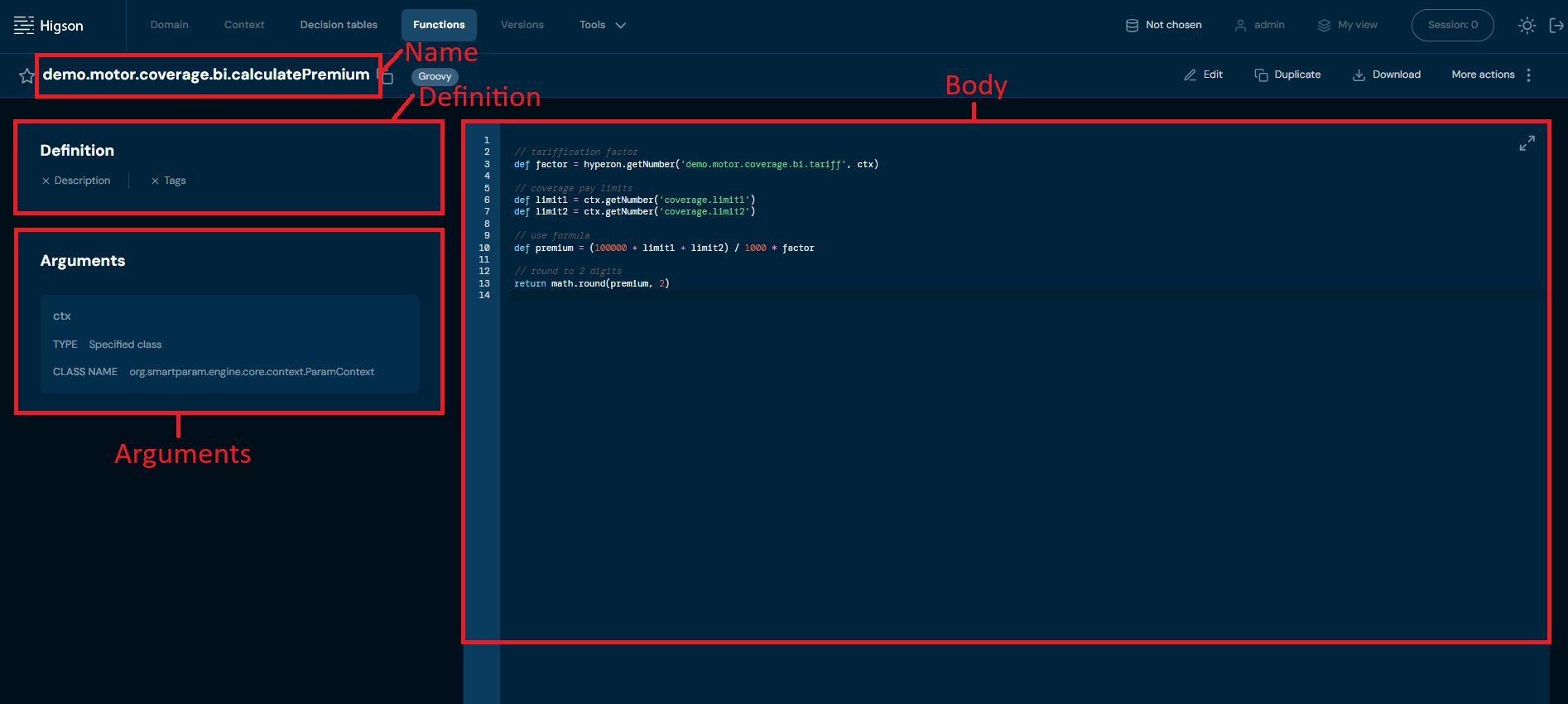
Higson functions consists of the following components:
- Name: The function’s unique identifier.
- Body: The core Groovy code snippet that implements the function’s logic.
- Definition: This section contains the function’s description and any assigned tags.
- Arguments: A list of arguments defined by the user. Each argument consists of a name and type. Supported argument types include:
- Boolean (similar to Java’s
boolean) - Integer (similar to Java’s
int) - Decimal (similar to Java’s
BigDecimal) - Date (similar to Java’s
Date) - Local Date (similar to Java’s
LocalDate) - Local DateTime (similar to Java’s
LocalDateTime) - String (similar to Java’s
String) - Object (similar to Java’s
Object)
- Boolean (similar to Java’s
By default, each Higson function has a special argument called ctx, which references the context object. This context object is accessible within the function body. For further details on this topic, refer to the documentation below.
Available Objects in the Function Body#
Several objects are accessible within the function body, including:
- ctx: The context object, representing the default argument of the function.
- higson: An object providing access to decision tables and function calls.
- log: A reference to the logger utility class.
- date: A utility class for working with dates supported by Higson.
- math: A utility class that provides mathematical functions for use within Higson functions.
- str: A utility class for working with strings.
- util: A reference to a common utility class.
- type: A reference to a utility class for programming types.
- domain: A reference to a utility class for domain types.
Each of these is documented with its methods and pitfalls in Built-in Objects in a Function.
Reading from and writing to the context is covered separately in Reading and Writing the Context.
Built-in Type Converters#
Higson also includes a set of built-in type converters, which help convert values between different data types. These converters are:
| Type Converter | Type | Example |
|---|---|---|
| _dec(x) | BigDecimal | def value = _dec(x) |
| _dec(x, n) | BigDecimal rounded to n places | def value = _dec(x, n) |
| _num(x) | double | def value = _num(x) |
| _num(x, n) | double rounded | def value = _num(x, n) |
| _int(x) | Integer | def value = _int(x) |
| _str(x) | String | def value = _str(x) |
| _bool(x) | boolean | def value = _bool(x) |
| _date(x) | java.util.Date | def value = _date(x) |
Retrieving Values from a Decision Table#
The following table outlines the structure of decision table calls, detailing the type of data returned and the default values in case of missing data:
| Method | Type Returned | In Case of Missing Data |
|---|---|---|
higson.getValue('decisionTableName', ctx) |
entire matrix | empty matrix if not found |
higson.getString('decisionTableName', ctx) |
String | null |
higson.getDecimal('decisionTableName', ctx) |
BigDecimal | null |
higson.getInteger('decisionTableName', ctx) |
Integer | null |
higson.getNumber('decisionTableName', ctx) |
double | 0 if not found |
higson.getBoolean('decisionTableName', ctx) |
boolean | false if not found |
higson.getDate('decisionTableName', ctx) |
java.util.Date | null |
higson.getLocalDate('decisionTableName', ctx) |
java.time.LocalDate | null |
higson.getLocalDateTime('decisionTableName', ctx) |
java.time.LocalDateTime | null |
Every method in the table also accepts key/value tokens instead of — or in addition to — ctx, which lets one function query the same table for several scenarios:
higson.getDecimal('demo.motor.price', ctx, 'car.model.year', '2020')   // ctx with one path overridden
higson.getDecimal('demo.motor.price', 'car.model.type', 'BMW')         // context built on the fly
higson.createContext(ctx, 'car.model.year', '2020')                    // reusable context object
EXAMPLE: Retrieving Value from a Decision Table
In this example, we will demonstrate how to retrieve a value from the decision table demo.motor.coverage.bi.tariff. This decision table has two IN levels defined by gender and age, with the values for these levels being sourced from the context data (see picture below). The result of the decision table lookup will be the tariff’s factor from the output level.
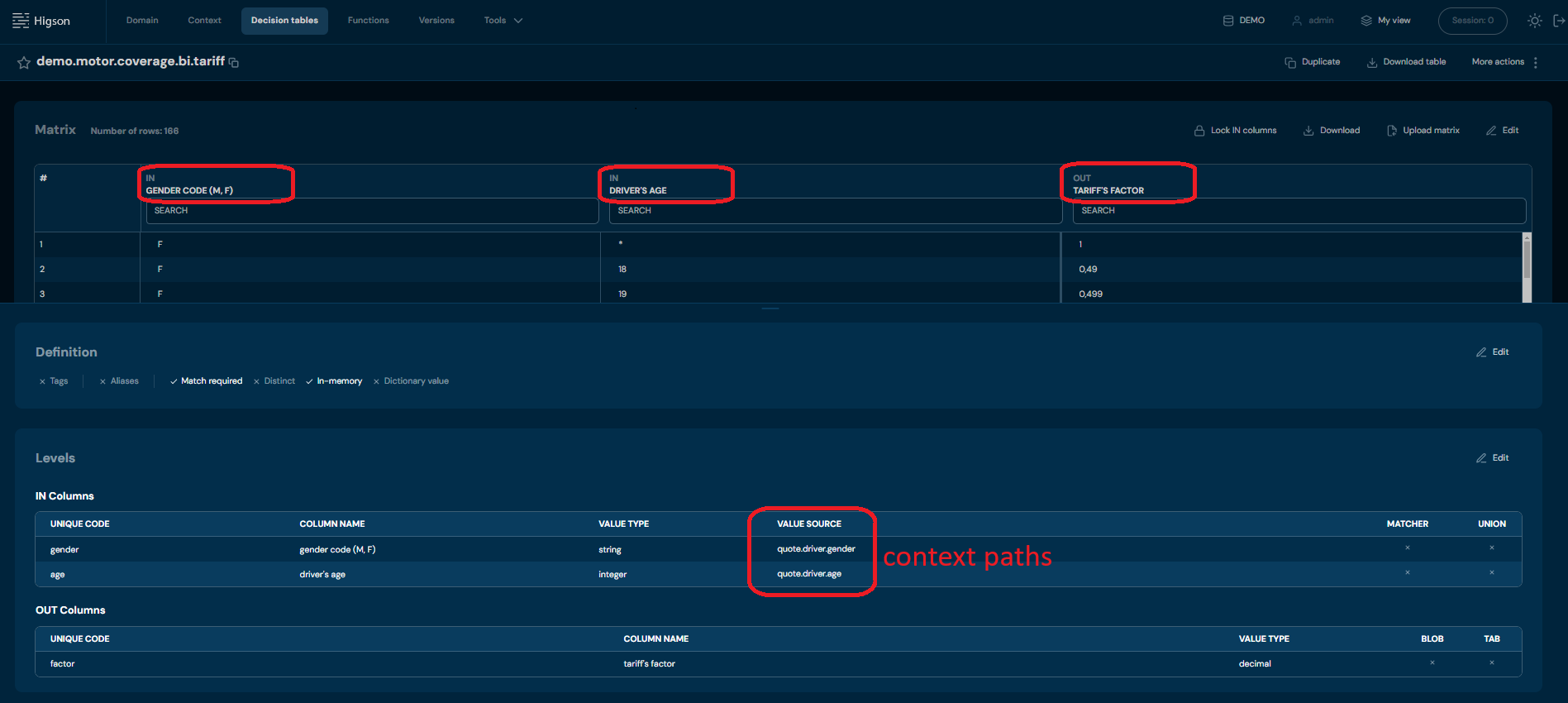
To retrieve the output from the decision table demo.motor.coverage.bi.tariff use the following code:
def factor = higson.getNumber('demo.motor.coverage.bi.tariff', ctx)
Code breakdown:
higson.getNumberis used to query the decision tabledemo.motor.coverage.bi.tariff.- The argument,
ctx, allows reaching into the object context. - The decision table reads the levels (gender and age) from the context and identifies the corresponding row.
- Based on this input, the appropriate output row is returned, containing the tariff’s factor.
Working with a Matrix#
When a table has several OUT columns, or when the context matches more than one row, use getValue to get the whole matrix:
def matrix = higson.getValue('decisionTableName', ctx)

if (matrix == null || matrix.isEmpty()) {
    return null
}

for (def row in matrix) {
    def price = row.getDecimal('price')
}
The isEmpty() guard is not optional: when nothing matches, getValue returns an empty matrix whose row() yields null rather than throwing, so the failure would otherwise surface later as a NullPointerException.
Reading rows by index, addressing columns by name or position, converting types, multi-value columns and treating the matrix as a Groovy collection are covered in Working with Decision Table Results.
Calling Other Functions#
To call another function from within the body of your function, use the following syntax:
higson.call(‘functionName’, ctx)
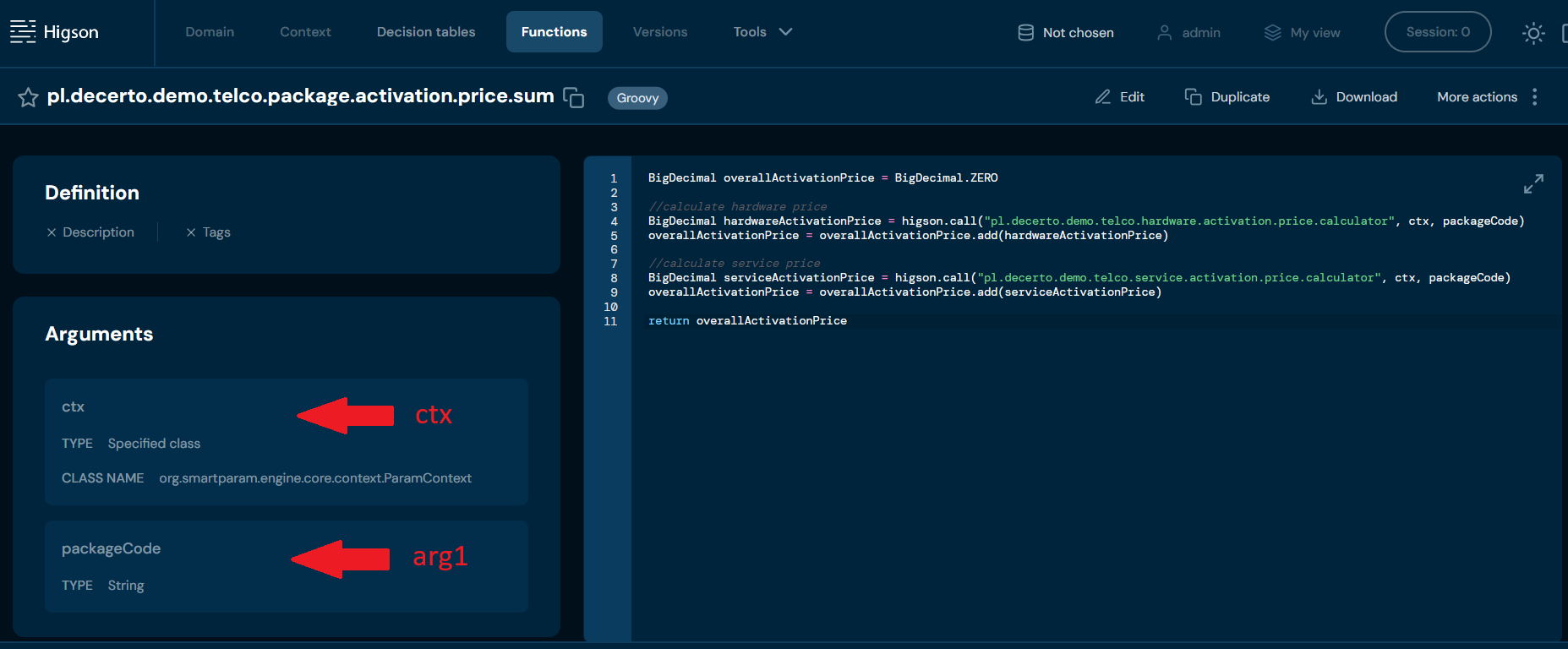
If the function you are calling requires arguments, you can pass them as follows:
higson.call(‘functionName’, ctx, arg1, arg2, ..)
where arg1, arg2, etc., are optional arguments for the function.
When calling another function, make sure to consider the data type it returns. The table below outlines various function calls and the types of data they return:
| Method | Returned Type |
|---|---|
higson.call('functionName', ctx, ...) |
returns any object from function |
higson.callString('functionName', ctx, ...) |
String |
higson.callDecimal('functionName', ctx, ...) |
BigDecimal |
higson.callInteger('functionName', ctx, ...) |
Integer |
higson.callNumber('functionName', ctx, ...) |
double |
higson.callBoolean('functionName', ctx, ...) |
boolean |
higson.callDate('functionName', ctx, ...) |
java.util.Date |
higson.callLocalDate('functionName', ctx, ...) |
java.time.LocalDate |
higson.callLocalDateTime('functionName', ctx, ...) |
java.time.LocalDateTime |
higson.callValue('functionName', ctx, ...) |
entire matrix — see Working with Decision Table Results |
EXAMPLE:
def result = higson.callDecimal(‘pl.decerto.demo.telco.hardware.activation.price.calculator’, ctx, packageCode)
Keep in mind that the order of the arguments must match the order in which they were defined in the function. The ctx argument is always the first one, as it is automatically included when the function is created
Accessing Domain Elements#
The table below lists methods for accessing domain elements, along with the results returned by each method.
| Method | Result |
|---|---|
domain.get('profile', 'path') |
Returns DomainElement for specified path. |
domain.get('profile') |
Returns DomainElement for root. |
domainObj.get('path') |
Returns DomainElement for path relative to domainObj. Throws an exception if the path is unknown. |
domainObj.getSafe('path') |
Returns DomainElement for path relative to domainObj. Does not throw an exception if the path is unknown. |
domainObj.get('path', 'elementCode') |
Returns a DomainElement with the specified elementCode for the collection path. |
domainObj.getSafe('path', 'elementCode') |
Returns a DomainElement with the specified elementCode for the collection path. Does not throw an exception if the path is unknown. |
domainObj.getAll('path') |
Returns all elements for the collection at the specified path. |
Domain paths should be written according to this pattern:
/Collection1[Collection1_Element]/Collection[Collection2_Element]
EXAMPLE 1:
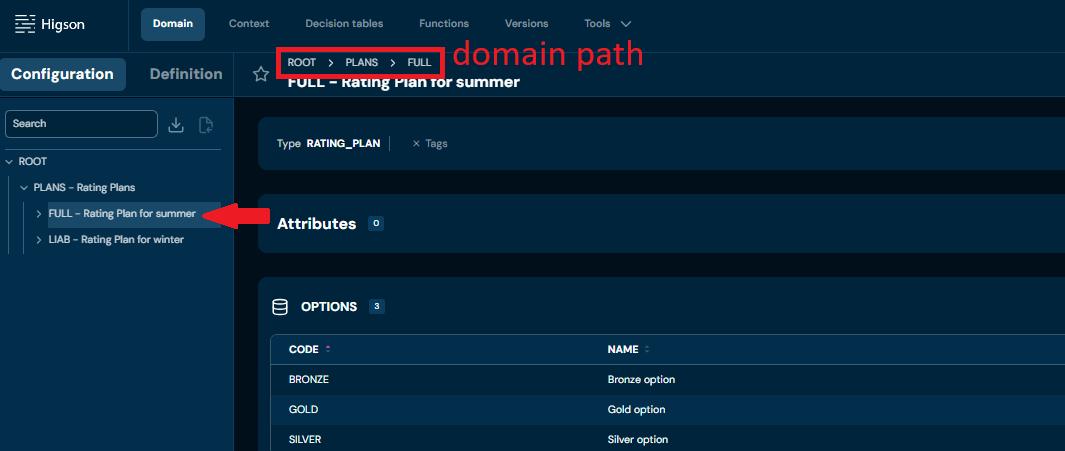
def domainObj = domain.get(‘DEMO’, ‘/PLANS[FULL]’)
In this example, we access the FULL element in the PLANS - Rating Plan collection in the Domain Configuration of profile DEMO, as shown in the screen below.
EXAMPLE 2:
def rootObj = domain.get(‘DEMO’)
In this example, we access directly to the ROOT of the profile DEMO.
Reading Domain Attributes#
The table below outlines methods for accessing domain attributes and the corresponding data types returned by each method.
| Method | Returned type |
|---|---|
domainObj.getAttrString(attributeName, ctx) |
String |
domainObj.getAttrDecimal(attributeName, ctx) |
BigDecimal |
domainObj.getAttrInteger(attributeName, ctx) |
Integer |
domainObj.getAttrNumber(attributeName, ctx) |
double |
domainObj.getAttrBoolean(attributeName, ctx) |
boolean |
domainObj.getAttrDate(attributeName, ctx) |
java.util.Date |
domainObj.getAttrValue(attributeName, ctx) |
ParamValue |
EXAMPLE:
In this example, we’ll demonstrate how to retrieve the Position attribute from a domain configuration, similar to the one shown in the screenshot below.
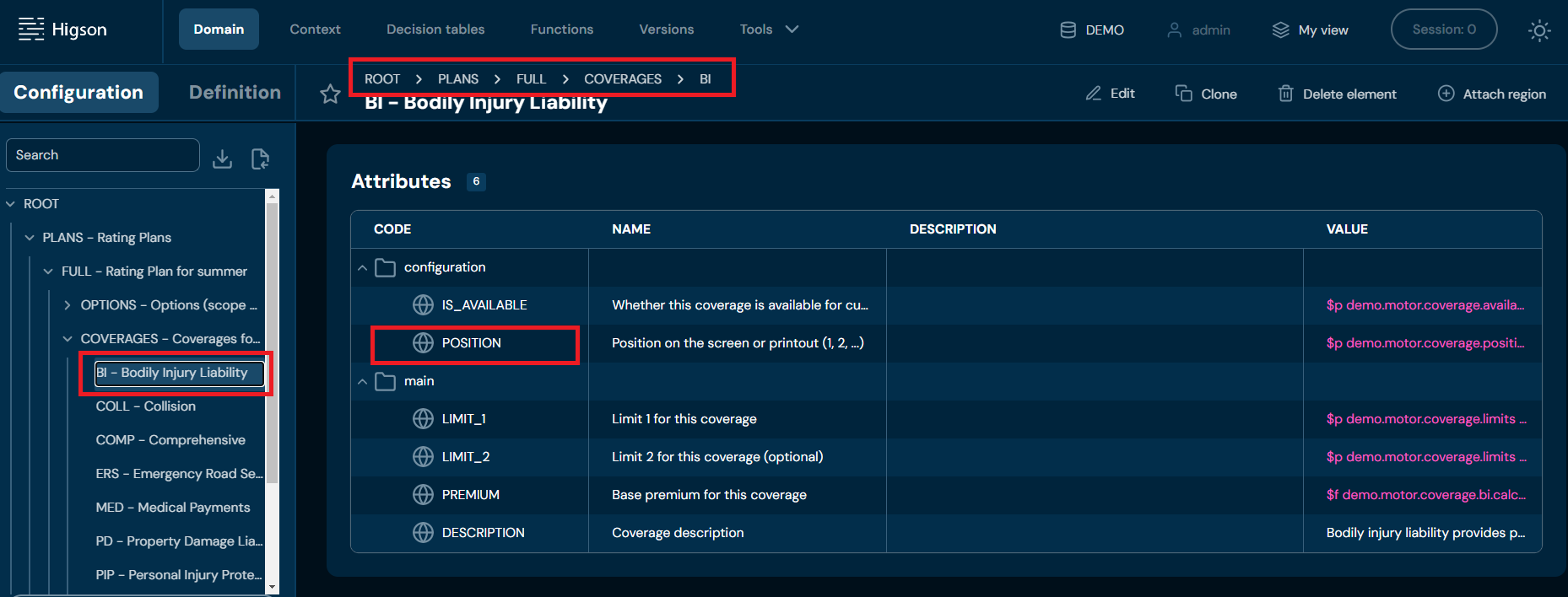
Steps to Retrieve the Position Attribute
- Access the Domain Configuration: First, we access the relevant domain configuration element.
- Retrieve the Position Attribute: Once we have the element, we retrieve the Position attribute using the getAttrInteger method.
Code:
def coverage = domain.get('DEMO', '/PLANS[FULL]/COVERAGES[BI]')
def position = coverage.getAttrInteger('POSITION', ctx)
return position
Reading Code and Name#
Dedicated functions are available to retrieve the code and name of a domain element. Below are examples demonstrating how to call these functions.
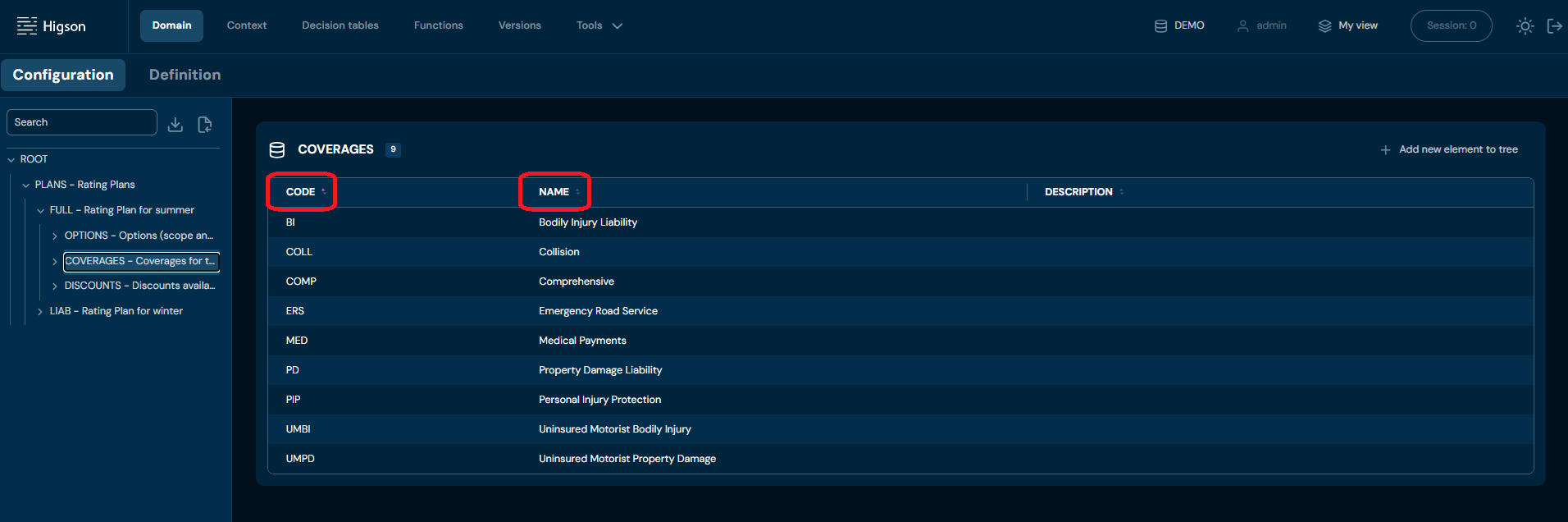
EXAMPLE: Reading the BI element code
def coverage = domain.get('DEMO', '/PLANS[FULL]/COVERAGES[BI]')
def coverageCode = coverage.code
EXAMPLE: Reading the BI element name
def coverage = domain.get('DEMO', '/PLANS[FULL]/COVERAGES[BI]')
def coverageName = coverage.name
Reading Values from Context#
The table below lists methods for accessing context elements, along with the data types they return.
| Method | Returned type |
|---|---|
ctx.getString('path') |
String |
ctx.getDecimal('path') |
BigDecimal |
ctx.getInteger('path') |
Integer |
ctx.getNumber('path') |
double |
ctx.getBoolean('path') |
boolean |
ctx.getDate('path') |
java.util.Date |
ctx.getLocalDate('path') |
LocalDate |
Context Path Format#
Context paths should follow this pattern:
Type1.Type2.Type2_Attribute
EXAMPLE:
def value = ctx.getInteger(‘quote.driver.age’)
In this simple example, age is an attribute of the Driver type, which is a subtype of the Quote type. Note that the ROOT is omitted in context paths.
Getting Collection#
To retrieve a collection, use the following method:
def collection = ctx.get(collectionPath)
You can iterate over the collection elements as shown below:
for (elementCtx in collection) {

    def x = elementCtx.getNumber(relativePath)
}
Getting Sub-Context or Intermediate Node#
To retrieve a sub-context or an intermediate node, use the following methods:
def node = ctx.get(nodePath)
def value = node.getString(relativePath)
EXAMPLE:
def risks = ctx.get('policy.risks')
for (def risk in risks) {
    def premium = risk.getDecimal('premium')
    def sumInsured = risk.getDecimal('sumInsured')
}
In example above, we navigate to the risks context node, then retrieve the values of the premium and sumInsured attributes (both of type number) into the corresponding variables.
Using Functions in Cascade Expressions#
In complex business configurations, operations on objects or data often need to be performed sequentially, where one operation triggers another. In Higson, cascade expressions allow this kind of functionality and can be used in the following configuration elements:
- Value source field of decision tables
- Cells in the matrix of the output levels of decision tables
- Domain attributes
| Expression | Description |
|---|---|
$f fun |
Executes the function fun. |
$f fun (1, 5, active) |
Executes the function fun with the arguments: 1, 5, and active. |
$f fun (1; 5; active) |
Executes the function fun with the arguments: 1, 5, and active. If a semicolon is used, it acts as the argument separator. |
$f fun (ctx:path, 5) |
Executes the function fun where the first argument is the value from the context path and the second is 5. |
$f fun [idx] |
If the function fun returns a complex object (e.g., ParamValue, MultiValue, array, Collection, or Iterable), it retrieves the element at the specified index idx. |
$f fun [code] |
If the function fun returns a complex object (e.g., ParamValue, MultiValue, or Map), it retrieves the value associated with the specified code. |
EXAMPLE:
$f fun (1, ctx:risk.code) [factor]
In this example, the function fun is executed with the value of ctx:risk.code as an argument, and the result is filtered by the factor element if the return type is a complex object.
Higson Function Example#
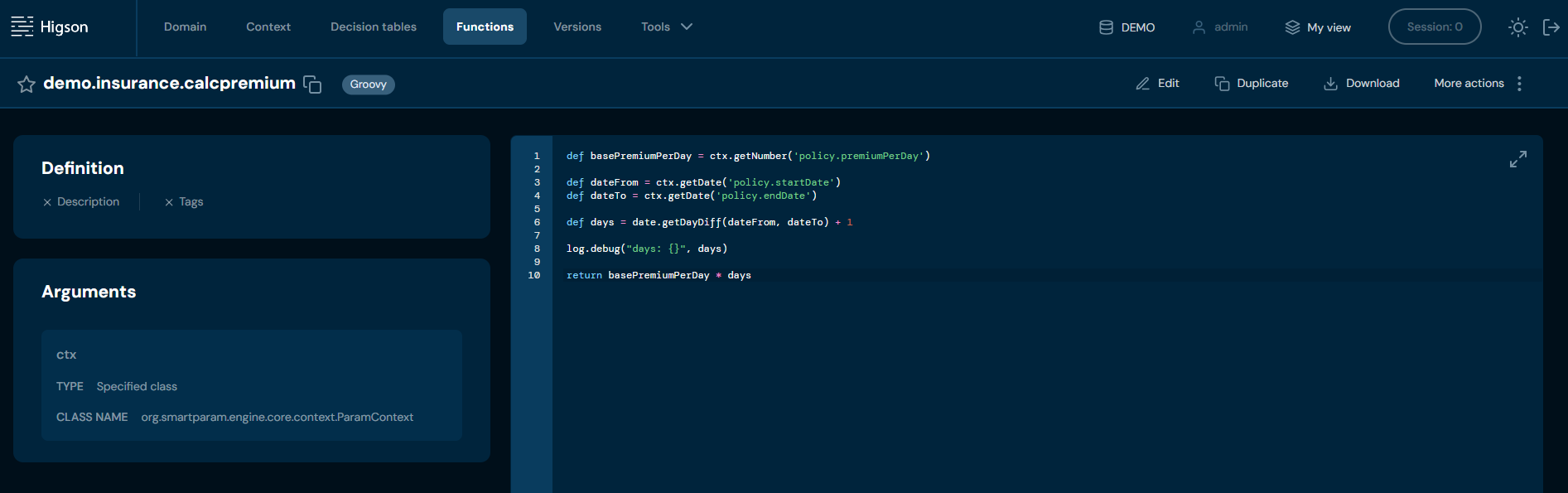
Above function calculates the total premium for a policy based on the premium per day and the number of days the policy is active.
Using Flows in Cascade Expressions#
To call a flow use $w notation.
EXAMPLE:
$w flow (1,active)